> ## Documentation Index
> Fetch the complete documentation index at: https://docs.getalai.com/llms.txt
> Use this file to discover all available pages before exploring further.
# Getting Started
> Build AI-powered presentation generation into your applications with the Alai API.
[Alai](https://www.getalai.com) transforms how teams create presentations. Instead of spending hours in PowerPoint, describe what you need and get professionally designed slides in seconds.
The **Alai API** brings this power to your applications. Generate presentations programmatically, integrate with your workflows, and automate slide creation at scale.
We also support the [Model Context Protocol (MCP)](/api/mcp) for seamless integration with MCP clients like Claude, Cursor, and VS Code, and the [Agent2Agent (A2A) protocol](/api/a2a) for autonomous agents that need to delegate presentation editing to Alai.
 ***
## What You Can Build
Turn text, notes, or documents into complete slide decks with AI-powered design
Programmatically add new slides to existing presentations
Get shareable links, PDFs, or PowerPoint files
Get structured content and layout information from slides
***
## How It Works
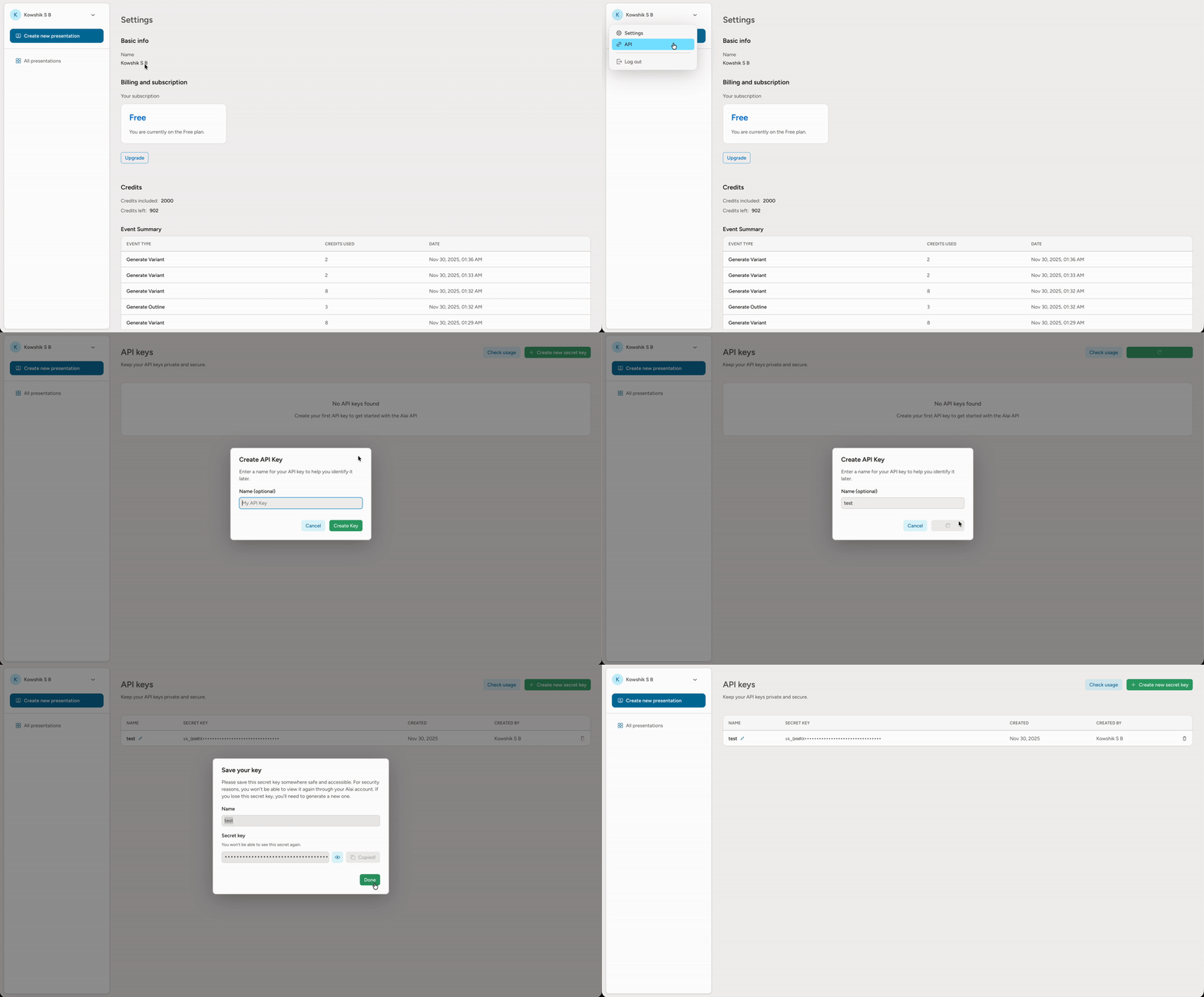
Sign up at [app.getalai.com](https://app.getalai.com) and generate an API key from your account settings.
POST to `/generations` with your text content. You'll receive a `generation_id` immediately.
Check `GET /generations/{id}` every few seconds until status is `completed`.
Get shareable links, download PDFs, or export to PowerPoint from the response.
***
## Quick Example
```python Python theme={null}
import requests
import time
API_KEY = "your_api_key"
BASE_URL = "https://slides-api.getalai.com/api/v1"
# 1. Generate presentation
response = requests.post(
f"{BASE_URL}/generations",
headers={"Authorization": f"Bearer {API_KEY}"},
json={
"input_text": "Q4 revenue grew 25%. Key wins: Enterprise deals and product launches.",
"presentation_options": {"title": "Q4 Results", "slide_range": "6-10"},
"export_formats": ["link", "pdf"]
}
)
generation_id = response.json()["generation_id"]
# 2. Poll until complete
while True:
status = requests.get(
f"{BASE_URL}/generations/{generation_id}",
headers={"Authorization": f"Bearer {API_KEY}"}
).json()
if status["status"] == "completed":
print(f"View: {status['formats']['link']['url']}")
print(f"PDF: {status['formats']['pdf']['url']}")
break
elif status["status"] == "failed":
raise Exception(status.get("error"))
time.sleep(3)
```
```bash cURL theme={null}
# 1. Generate presentation
curl -X POST "https://slides-api.getalai.com/api/v1/generations" \
-H "Authorization: Bearer YOUR_API_KEY" \
-H "Content-Type: application/json" \
-d '{
"input_text": "Q4 revenue grew 25%. Key wins: Enterprise deals and product launches.",
"presentation_options": {"title": "Q4 Results", "slide_range": "6-10"},
"export_formats": ["link", "pdf"]
}'
# Response: {"generation_id": "abc123-..."}
# 2. Poll for status
curl "https://slides-api.getalai.com/api/v1/generations/abc123-..." \
-H "Authorization: Bearer YOUR_API_KEY"
```
```javascript JavaScript theme={null}
const API_KEY = "your_api_key";
const BASE_URL = "https://slides-api.getalai.com/api/v1";
// 1. Generate presentation
const response = await fetch(`${BASE_URL}/generations`, {
method: "POST",
headers: {
"Authorization": `Bearer ${API_KEY}`,
"Content-Type": "application/json"
},
body: JSON.stringify({
input_text: "Q4 revenue grew 25%. Key wins: Enterprise deals and product launches.",
presentation_options: { title: "Q4 Results", slide_range: "6-10" },
export_formats: ["link", "pdf"]
})
});
const { generation_id } = await response.json();
// 2. Poll until complete
const poll = async () => {
while (true) {
const res = await fetch(`${BASE_URL}/generations/${generation_id}`, {
headers: { "Authorization": `Bearer ${API_KEY}` }
});
const status = await res.json();
if (status.status === "completed") {
console.log("View:", status.formats.link.url);
console.log("PDF:", status.formats.pdf.url);
return status;
} else if (status.status === "failed") {
throw new Error(status.error);
}
await new Promise(r => setTimeout(r, 3000));
}
};
await poll();
```
***
## Get Your API Key
1. **Sign up** at [app.getalai.com](https://app.getalai.com)
2. **Click on your name** in the left sidebar
3. **Select "API"** from the dropdown menu
4. **Click "Add new API key"** to generate your key
5. **Copy and securely store** your API key
Keep your API key secure and never share it publicly. Treat it like a password.
***
## Authentication
All requests require a Bearer token in the `Authorization` header:
```bash theme={null}
Authorization: Bearer YOUR_API_KEY
```
**Base URL:**
```
https://slides-api.getalai.com/api/v1
```
***
## Available Endpoints
### Async Operations
These endpoints return a `generation_id`. Poll `GET /generations/{id}` until complete.
| Endpoint | Method | Description |
| --------------------------------- | ------ | ------------------------------------- |
| `/generations` | POST | Generate a presentation from text |
| `/presentations/{id}/slides` | POST | Add a slide to a presentation |
| `/presentations/{id}/exports` | POST | Export to PDF, PPT, or shareable link |
| `/presentations/{id}/transcripts` | POST | Extract slide content and layout |
### Synchronous Operations
These endpoints return results immediately.
| Endpoint | Method | Description |
| --------------------------------------- | ------ | --------------------------------------------------------- |
| `/ping` | GET | Verify your API key |
| `/themes` | GET | List theme IDs and names available to your account |
| `/vibes` | GET | List vibe IDs, names, and source for visual style presets |
| `/generations/{id}` | GET | Check generation status |
| `/upload-images` | POST | Upload images for presentations |
| `/presentations/{id}/slides/{slide_id}` | DELETE | Delete a slide |
| `/presentations/{id}` | DELETE | Delete a presentation |
***
## Generation Status
When polling, you'll see one of these status values:
| Status | Description |
| ------------- | ------------------------------------ |
| `pending` | Queued, not yet started |
| `in_progress` | Currently processing |
| `completed` | Finished successfully |
| `failed` | Error occurred (check `error` field) |
Poll every 5 seconds. Most generations complete within 1-3 minutes depending on slide count.
***
## Available Themes
Use `GET /themes` to discover the theme IDs and display names available to the authenticated user, including system themes and any user themes you can access.
Theme selection now primarily uses `theme_id` values returned by that endpoint. Legacy theme display names are still accepted for backward compatibility, but they are deprecated.
See the [Get Themes](/api/get-themes) reference for the response format and example usage.
***
## Vibes
A **vibe** is a visual aesthetic preset (mood, palette, illustration style) applied to creative slide variants. Pass `presentation_options.vibe_id` on a generation request to use one.
Use `GET /vibes` to discover the vibe IDs available to your account, including system vibes and any custom vibes you have created. When `vibe_id` is set, you must also set `image_options.num_image_variants >= 1` — vibes are applied through creative image variants.
See the [Get Vibes](/api/get-vibes) reference for the response format and example usage.
***
## Rate Limits
* **Max 5 concurrent generations** per user
* Recommended polling interval: 5 seconds
Need higher rate limits? Reach out to the Alai team at [founders@getalai.com](mailto:founders@getalai.com).
***
## Credits
API generations consume the same credits as the [Alai app](https://www.getalai.com). To check your balance or purchase more credits:
* Go to **Settings** in your [Alai account](https://app.getalai.com)
* Or contact [founders@getalai.com](mailto:founders@getalai.com) for enterprise plans
***
## Error Handling
| Code | Description |
| ----- | ----------------------------------------- |
| `200` | Success |
| `400` | Bad Request - Invalid parameters |
| `401` | Unauthorized - Invalid or missing API key |
| `402` | Payment Required - Insufficient credits |
| `404` | Not Found - Resource doesn't exist |
| `422` | Validation Error - Check request body |
| `429` | Rate limit exceeded |
| `500` | Internal Server Error |
Error responses include details:
```json theme={null}
{
"message": "Error description",
"status_code": 400
}
```
***
## Next Steps
Complete Python examples with a helper client class
Full API reference for presentation generation
Connect MCP clients like Claude and Cursor to Alai
Delegate presentation editing to Alai from your own AI agent
***
## What You Can Build
Turn text, notes, or documents into complete slide decks with AI-powered design
Programmatically add new slides to existing presentations
Get shareable links, PDFs, or PowerPoint files
Get structured content and layout information from slides
***
## How It Works
Sign up at [app.getalai.com](https://app.getalai.com) and generate an API key from your account settings.
POST to `/generations` with your text content. You'll receive a `generation_id` immediately.
Check `GET /generations/{id}` every few seconds until status is `completed`.
Get shareable links, download PDFs, or export to PowerPoint from the response.
***
## Quick Example
```python Python theme={null}
import requests
import time
API_KEY = "your_api_key"
BASE_URL = "https://slides-api.getalai.com/api/v1"
# 1. Generate presentation
response = requests.post(
f"{BASE_URL}/generations",
headers={"Authorization": f"Bearer {API_KEY}"},
json={
"input_text": "Q4 revenue grew 25%. Key wins: Enterprise deals and product launches.",
"presentation_options": {"title": "Q4 Results", "slide_range": "6-10"},
"export_formats": ["link", "pdf"]
}
)
generation_id = response.json()["generation_id"]
# 2. Poll until complete
while True:
status = requests.get(
f"{BASE_URL}/generations/{generation_id}",
headers={"Authorization": f"Bearer {API_KEY}"}
).json()
if status["status"] == "completed":
print(f"View: {status['formats']['link']['url']}")
print(f"PDF: {status['formats']['pdf']['url']}")
break
elif status["status"] == "failed":
raise Exception(status.get("error"))
time.sleep(3)
```
```bash cURL theme={null}
# 1. Generate presentation
curl -X POST "https://slides-api.getalai.com/api/v1/generations" \
-H "Authorization: Bearer YOUR_API_KEY" \
-H "Content-Type: application/json" \
-d '{
"input_text": "Q4 revenue grew 25%. Key wins: Enterprise deals and product launches.",
"presentation_options": {"title": "Q4 Results", "slide_range": "6-10"},
"export_formats": ["link", "pdf"]
}'
# Response: {"generation_id": "abc123-..."}
# 2. Poll for status
curl "https://slides-api.getalai.com/api/v1/generations/abc123-..." \
-H "Authorization: Bearer YOUR_API_KEY"
```
```javascript JavaScript theme={null}
const API_KEY = "your_api_key";
const BASE_URL = "https://slides-api.getalai.com/api/v1";
// 1. Generate presentation
const response = await fetch(`${BASE_URL}/generations`, {
method: "POST",
headers: {
"Authorization": `Bearer ${API_KEY}`,
"Content-Type": "application/json"
},
body: JSON.stringify({
input_text: "Q4 revenue grew 25%. Key wins: Enterprise deals and product launches.",
presentation_options: { title: "Q4 Results", slide_range: "6-10" },
export_formats: ["link", "pdf"]
})
});
const { generation_id } = await response.json();
// 2. Poll until complete
const poll = async () => {
while (true) {
const res = await fetch(`${BASE_URL}/generations/${generation_id}`, {
headers: { "Authorization": `Bearer ${API_KEY}` }
});
const status = await res.json();
if (status.status === "completed") {
console.log("View:", status.formats.link.url);
console.log("PDF:", status.formats.pdf.url);
return status;
} else if (status.status === "failed") {
throw new Error(status.error);
}
await new Promise(r => setTimeout(r, 3000));
}
};
await poll();
```
***
## Get Your API Key
1. **Sign up** at [app.getalai.com](https://app.getalai.com)
2. **Click on your name** in the left sidebar
3. **Select "API"** from the dropdown menu
4. **Click "Add new API key"** to generate your key
5. **Copy and securely store** your API key
Keep your API key secure and never share it publicly. Treat it like a password.
***
## Authentication
All requests require a Bearer token in the `Authorization` header:
```bash theme={null}
Authorization: Bearer YOUR_API_KEY
```
**Base URL:**
```
https://slides-api.getalai.com/api/v1
```
***
## Available Endpoints
### Async Operations
These endpoints return a `generation_id`. Poll `GET /generations/{id}` until complete.
| Endpoint | Method | Description |
| --------------------------------- | ------ | ------------------------------------- |
| `/generations` | POST | Generate a presentation from text |
| `/presentations/{id}/slides` | POST | Add a slide to a presentation |
| `/presentations/{id}/exports` | POST | Export to PDF, PPT, or shareable link |
| `/presentations/{id}/transcripts` | POST | Extract slide content and layout |
### Synchronous Operations
These endpoints return results immediately.
| Endpoint | Method | Description |
| --------------------------------------- | ------ | --------------------------------------------------------- |
| `/ping` | GET | Verify your API key |
| `/themes` | GET | List theme IDs and names available to your account |
| `/vibes` | GET | List vibe IDs, names, and source for visual style presets |
| `/generations/{id}` | GET | Check generation status |
| `/upload-images` | POST | Upload images for presentations |
| `/presentations/{id}/slides/{slide_id}` | DELETE | Delete a slide |
| `/presentations/{id}` | DELETE | Delete a presentation |
***
## Generation Status
When polling, you'll see one of these status values:
| Status | Description |
| ------------- | ------------------------------------ |
| `pending` | Queued, not yet started |
| `in_progress` | Currently processing |
| `completed` | Finished successfully |
| `failed` | Error occurred (check `error` field) |
Poll every 5 seconds. Most generations complete within 1-3 minutes depending on slide count.
***
## Available Themes
Use `GET /themes` to discover the theme IDs and display names available to the authenticated user, including system themes and any user themes you can access.
Theme selection now primarily uses `theme_id` values returned by that endpoint. Legacy theme display names are still accepted for backward compatibility, but they are deprecated.
See the [Get Themes](/api/get-themes) reference for the response format and example usage.
***
## Vibes
A **vibe** is a visual aesthetic preset (mood, palette, illustration style) applied to creative slide variants. Pass `presentation_options.vibe_id` on a generation request to use one.
Use `GET /vibes` to discover the vibe IDs available to your account, including system vibes and any custom vibes you have created. When `vibe_id` is set, you must also set `image_options.num_image_variants >= 1` — vibes are applied through creative image variants.
See the [Get Vibes](/api/get-vibes) reference for the response format and example usage.
***
## Rate Limits
* **Max 5 concurrent generations** per user
* Recommended polling interval: 5 seconds
Need higher rate limits? Reach out to the Alai team at [founders@getalai.com](mailto:founders@getalai.com).
***
## Credits
API generations consume the same credits as the [Alai app](https://www.getalai.com). To check your balance or purchase more credits:
* Go to **Settings** in your [Alai account](https://app.getalai.com)
* Or contact [founders@getalai.com](mailto:founders@getalai.com) for enterprise plans
***
## Error Handling
| Code | Description |
| ----- | ----------------------------------------- |
| `200` | Success |
| `400` | Bad Request - Invalid parameters |
| `401` | Unauthorized - Invalid or missing API key |
| `402` | Payment Required - Insufficient credits |
| `404` | Not Found - Resource doesn't exist |
| `422` | Validation Error - Check request body |
| `429` | Rate limit exceeded |
| `500` | Internal Server Error |
Error responses include details:
```json theme={null}
{
"message": "Error description",
"status_code": 400
}
```
***
## Next Steps
Complete Python examples with a helper client class
Full API reference for presentation generation
Connect MCP clients like Claude and Cursor to Alai
Delegate presentation editing to Alai from your own AI agent